This is the first post in my ongoing series about T4 (Text Templates). I will describe basics to ensure that we are talking on the same language. If you know what T4 is, just skip this stuff.
What is that?
The Text Templates or simply
T4 is general purpose text templates that
comes out of the box with Visual Studio (starting from Visual
Studio 2008). Text Templates look and behave very
similar to the ASPX, ASP or even
PHP files. Both are just templates that allows
code included in. Unlike ASPX,
T4 does not allow code behaind.
How to start?
Easy. Create text file with extension .tt and
content:
<#@ template debug="false" hostspecific="false" language="C#" #>
    <#@ assembly Name="System.Core.dll" #>
    <#@ output extension=".cs" #>
    class Test
    {
    	public void DoSomething()
    	{
    		System.Console.WriteLine("Generated at {0}",
    			"<#= DateTime.Now.ToString() #>");
    	}
    }
Press Ctrl+S and now you can see generated code.
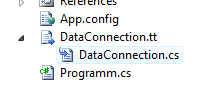
Thats it, you have done with your first
Text Template.
BTW, the Visual Studio 2010 already comes with
templates for Text Templates (funny, yeh?) out of
the box. For the Visual Studio 2008 you can use
custom T4 templates.
Where to read more?
Generating Artifacts By Using Text Templates - Text Templates landing page on MSDN
Oleg Sych, Site Archives T4 - awesome blog about T4, for example - Pros and Cons of T4 in Visual Studio 2008.
T4 on Patterns and Practices Guidance - Many examples
What next?
I already have drafts about building DSL with T4. Also I have some tips to share. So let hope to see something interesting.
This post in Ukrainian - T4 (Visual Studio Text Templates) - The Beginning
For comments or feedback, write at x.com/chaliy.